

ComfyUI Nodes
ComfyUI-Tripo is Tripo’s official custom-node extension for ComfyUI. It supports generating 3D models from text, a single image, or multiview images within ComfyUI workflows, along with model import, texturing, mesh processing, low-poly optimization, Smart UV, rigging, animation retargeting, format conversion, and retopology.
| Item | Value |
|---|---|
| Node package version | 2.0.0 |
| Source tag | v2.0.0 |
| Dependency | tripo3d>=1.0.0,<2.0.0 |
| Source | VAST-AI-Research/ComfyUI-Tripo |
tripo3d 1.x. Plugin 1.x still runs on the v2 API, so upgrade to 2.0.0 and reinstall its dependencies. Saved workflows still open: no node, input name, or input order has changed, and new inputs are appended at the end with defaults that keep the previous behavior.
Capabilities and changelog
Capabilities
- Generate 3D models from text prompts.
- Generate 3D models from images.
- Import models from a URL through
model_url. - Support splitting models into separate parts.
- Smart low poly and Smart UV unwrapping.
- Rig and animate 3D models.
- Convert formats and retopologize models.
Draft refinement and model stylization are no longer supported as of 2.0.0. Both nodes are marked deprecated and hidden from the node search. Saved workflows still open, but a run stops at either node with an explanation: no request is sent and no credits are used.
Changelog
- 2026-10-15: 2.0.0, migrated to Tripo API v3 (depends on
tripo3d1.x); added the Tripo: Smart UV node; generation supports P1 / P2; rigging supports v2.5 / v3.0 and more skeleton specs; texturing supports v3.5 (fast,delight); smart low poly supports v3.0 and Smart UV; mesh completion supports a completion mode; deprecated the Refine and Stylize nodes. - 2026-06-30: added Mesh Segmentation v2.0 for splitting models into separate parts and direct URL import through
model_url. - 2026-05-28: added model import.
- 2025-06-19: updated to the newest API and added more nodes.
- 2025-03-31: switched to the
tripo3dpackage. - 2025-02-24: removed
glbviewer. - 2025-02-01: adapted to the new API and switched model viewing to Preview 3D.
- 2024-11-11: adapted to the new API.
- 2024-10-14: added model conversion.
- 2024-09-13: added support for
model_versionv2.0-20240919.
Installation
Choose one method, then restart ComfyUI.
ComfyUI-Manager
Open Custom Nodes Manager, search for Tripo for ComfyUI, and install it.
comfy-cli
Install comfy-cli through Comfy Registry, then run:
comfy node registry-install comfyui-tripo
From source
Place the repository in ComfyUI/custom_nodes/ComfyUI-Tripo, then install its dependencies:
cd ComfyUI/custom_nodes
git clone https://github.com/VAST-AI-Research/ComfyUI-Tripo.git
python -m pip install -r ComfyUI-Tripo/requirements.txt
Dependency version
2.0.0 depends on tripo3d 1.x, which ComfyUI-Manager installs automatically when it installs or updates the package. If the ComfyUI log or a node error shows ComfyUI-Tripo needs tripo3d>=1.0.0,<2.0.0 or tripo3d is not installed, run the following command in the Python environment that ComfyUI uses, then restart ComfyUI:
python -m pip install "tripo3d>=1.0.0,<2.0.0"
API key configuration
Create an API key on the API Keys page, then configure it with one of the methods below.
The node package resolves an API key in this order:
- A non-empty
apikeyinput on the node. - The
TRIPO_API_KEYenvironment variable. config.jsonin the ComfyUI-Tripo directory, with aTRIPO_API_KEYfield.
The Generate and Import nodes expose apikey. Downstream nodes receive the resolved key through MODEL_INFO.
The nodes detect which region a key belongs to, so no endpoint needs to be configured. On the first call they query the balance on the global endpoint and then on the China endpoint, keep whichever succeeds, and reuse it for the rest of the ComfyUI session. Keys created on this site belong to the China region, so a single Failed to get Tripo API balance, trying again with global=True line followed by the balance in the log is expected.
Do not expose a real API key in screenshots, shared workflows, logs, or source repositories. Clear the apikey field before sharing a workflow and prefer an environment variable for local use.
Environment variable launch examples
Windows:
set TRIPO_API_KEY=tsk_XXXXXXX
python.exe main.py [--cpu]
Linux or macOS:
TRIPO_API_KEY=tsk_XXXXXXX python main.py [--cpu]
Node overview
ComfyUI-Tripo provides the following 12 Tripo nodes; the Refine and Stylize nodes are deprecated:
| Internal ID | Display name | Capability | Output |
|---|---|---|---|
TripoAPIDraft |
Tripo: Generate model | Generate from text, image, or multiple views | model_file, MODEL_INFO |
TripoImportModel |
Tripo: Import model | Import a local model or model URL | MODEL_INFO |
TripoTextureModel |
Tripo: Texture model | Texture a model | model_file, MODEL_INFO |
TripoRefineModel |
Tripo: Refine Draft model (Deprecated) | Deprecated (formerly draft refinement) | — |
TripoMeshSegmentation |
Tripo: Segment mesh | Segment a mesh | model_file, MODEL_INFO |
TripoMeshCompletion |
Tripo: Complete mesh | Complete a segmented mesh | model_file, MODEL_INFO |
TripoSmartLowPoly |
Tripo: Smart low poly | Create a low-poly model | model_file, MODEL_INFO |
TripoMeshUV |
Tripo: Smart UV | Unwrap UVs | model_file, MODEL_INFO, uv_render |
TripoStylizeModel |
Tripo: Stylize model (Deprecated) | Deprecated (formerly model stylization) | — |
TripoAnimateRigNode |
Tripo: Rig model | Automatically rig a model | model_file, MODEL_INFO |
TripoAnimateRetargetNode |
Tripo: Retarget rigged model | Apply a preset animation | model_file, MODEL_INFO |
TripoConvertNode |
Tripo: Convert model | Convert and export a model | model_file |
Preview 3D is provided by ComfyUI and is not one of these 12 nodes.
Connections and data flow
flowchart LR
    G["Generate model"] -->|MODEL_INFO| P["Model processing"]
    I["Import model"] -->|MODEL_INFO| P
    P -->|MODEL_INFO| R["Rig model"]
    R -->|MODEL_INFO| A["Retarget rigged model"]
    A -->|MODEL_INFO| C["Convert model"]
model_fileis the downloaded path produced by a generation or processing task. It can be sent to a ComfyUI preview or file-handling node.MODEL_INFOcontains the Tripo task context used by downstream Tripo nodes:task_id, resolvedapikey,file_prefix, andoutput_directory. TheMODEL_INFOfrom Rig also carriesrig_model_version, the rig version actually used, which Retarget checks before sending a request.- A model from outside this node chain must first pass through
TripoImportModel. A file path alone cannot replaceMODEL_INFO. - Connect nodes through
MODEL_INFOwhen further Tripo processing is required. Themodel_fileoutput is not the processing context.
Complete node reference
“Required” indicates whether a node parameter must be provided. The apikey field may be left empty to use the environment or configuration fallback. A dash means no explicit default is set.
Generation and import
TripoAPIDraft — Tripo: Generate model
Creates the first Tripo task in a workflow. It has no node prerequisite.
| Input | Type | Required | Default | Values or range |
|---|---|---|---|---|
mode |
ENUM | Yes | first value | text_to_model, image_to_model, multiview_to_model |
apikey |
STRING | Yes | empty | API key or fallback |
prompt |
STRING, multiline | No | empty | Text prompt |
negative_prompt |
STRING, multiline | No | empty | Negative text prompt; text mode only |
image |
IMAGE | No | — | Source image; front image in multiview mode |
image_left |
IMAGE | No | — | Optional left view |
image_back |
IMAGE | No | — | Optional back view |
image_right |
IMAGE | No | — | Optional right view |
model_version |
ENUM | No | v3.1-20260211 |
v1.4-20240625, v2.5-20250123, v3.0-20250812, v3.1-20260211, P1-20260311, P2-20260801 |
texture |
BOOLEAN | No | true |
Enable texture generation |
pbr |
BOOLEAN | No | true |
Enable PBR maps |
image_seed |
INT | No | 42 |
Used by text mode |
model_seed |
INT | No | 42 |
Model seed |
texture_seed |
INT | No | 42 |
Texture seed |
texture_quality |
ENUM | No | standard |
standard, detailed |
geometry_quality |
ENUM | No | standard |
standard, detailed; image mode only |
texture_alignment |
ENUM | No | original_image |
original_image, geometry; image and multiview modes |
face_limit |
INT | No | -1 |
-1–500000; values ≤ 0 are sent as unset |
quad |
BOOLEAN | No | false |
Request quad topology |
compress |
BOOLEAN | No | false |
Compress output |
generate_parts |
BOOLEAN | No | false |
Generate parts |
smart_low_poly |
BOOLEAN | No | false |
Enable smart low-poly generation |
auto_size |
BOOLEAN | No | false |
Automatically size the model |
orientation |
ENUM | No | default |
default, align_image; image and multiview modes |
file_prefix |
STRING | No | empty | Prefix for the downloaded filename |
output_directory |
STRING | No | empty | Destination directory override |
export_orientation |
ENUM | No | default |
default, +x, -x, +y, -y; default sends nothing and keeps the server’s default orientation |
2.0.0 removes v2.0-20240919, which API v3 no longer accepts. A saved workflow that selects it is refused before any request is sent; pick another version. With P1-20260311 or P2-20260801, the supported parameters and face-count ranges follow the P-series docs (text, image, multiview). The node’s face_limit input range is shared by every version and does not mean that each version accepts up to 500000.
Mode requirements:
| Mode | Conditionally required | Notes |
|---|---|---|
text_to_model |
prompt |
Fails with “Prompt is required” when empty |
image_to_model |
image |
Fails with “Image is required” when absent |
multiview_to_model |
image |
image is the front view; left, back, and right are optional |
Outputs: STRING model_file and MODEL_INFO. Common failures: missing conditional input, missing/invalid API key, rejected API task, or output move failure. Minimum connection: prompt or image → TripoAPIDraft → Preview 3D; use MODEL_INFO for later processing.
TripoImportModel — Tripo: Import model
Creates Tripo task context for a model that did not originate in this node chain.
| Input | Type | Required | Default | Values or range |
|---|---|---|---|---|
apikey |
STRING | Yes | empty | API key or fallback |
model_file |
file selector | No | none |
Model in the ComfyUI input directory |
model_url |
STRING | No | empty | Direct URL to a model, fetched by the Tripo server |
file_prefix |
STRING | No | empty | Prefix propagated to downstream downloads |
output_directory |
STRING | No | empty | Directory propagated to downstream downloads |
A non-empty model_url takes priority over model_file. The Tripo server fetches the URL directly instead of downloading it inside ComfyUI first, so it must be publicly reachable. If both are empty, the node fails. The upload control accepts .glb, .fbx, .obj, .stl, .ply, .3mf, and .gltf; the backend input scan also recognizes .zip.
Output: MODEL_INFO only. Common failures: neither source is provided, a local file is missing, the server cannot fetch the URL, the format is rejected, or the import task fails. Minimum connection: local file or URL → TripoImportModel → any processor that accepts MODEL_INFO.
Model processing
TripoTextureModel — Tripo: Texture model
Requires MODEL_INFO from Generate, Import, or another compatible processor.
| Input | Type | Required | Default | Values or range |
|---|---|---|---|---|
model_info |
MODEL_INFO | Yes | — | Upstream task context |
model_version |
ENUM | No | v3.0-20250812 |
v2.5-20250123, v3.0-20250812, v3.5-20260815 |
texture |
BOOLEAN | No | true |
Enable texture |
pbr |
BOOLEAN | No | true |
Enable PBR maps |
texture_seed |
INT | No | 42 |
Texture seed |
texture_quality |
ENUM | No | standard |
standard, detailed, fast; fast requires v3.5-20260815 |
texture_alignment |
ENUM | No | original_image |
original_image, geometry |
text_prompt |
STRING, multiline | No | empty | Texture guidance text |
image_prompt |
IMAGE | No | — | Texture reference |
style_image |
IMAGE | No | — | Style reference |
part_names |
STRING, multiline | No | empty | One part name per line |
compress |
BOOLEAN | No | false |
Compress output |
bake |
BOOLEAN | No | true |
Bake texture |
delight |
ENUM | No | auto |
auto, on, off; removes baked-in lighting from the reference image before texturing, read only by v3.5-20260815. auto sends nothing and uses the server default; on / off send true / false |
See Texture for the full parameter reference. Outputs: STRING model_file and MODEL_INFO. Common failures: incompatible task context, invalid reference image, or API task failure. Minimum connection: Generate/Import MODEL_INFO → TripoTextureModel → Preview 3D or another processor.
TripoMeshSegmentation — Tripo: Segment mesh
| Input | Type | Required | Default | Values or range |
|---|---|---|---|---|
model_info |
MODEL_INFO | Yes | — | Upstream task context |
model_version |
ENUM | Yes | v1.0-20250506 |
v1.0-20250506, v2.0-20260430 |
segmentation_granularity |
ENUM | No | balanced |
simple, balanced, detailed |
ref_image |
IMAGE | No | — | Segmentation reference image |
split_by_connectivity |
BOOLEAN | No | true |
Split disconnected geometry |
segmentation_granularity, ref_image, and split_by_connectivity are sent only with v2.0-20260430; v1 ignores them. Outputs: STRING model_file and MODEL_INFO. Common failures: incompatible model, invalid reference image, or API task failure. Minimum connection: Generate/Import MODEL_INFO → TripoMeshSegmentation → Completion or Preview 3D.
TripoMeshCompletion — Tripo: Complete mesh
| Input | Type | Required | Default | Values or range |
|---|---|---|---|---|
model_info |
MODEL_INFO | Yes | — | Segmented-model task context |
model_version |
ENUM | Yes | v1.0-20250506 |
v1.0-20250506 |
part_names |
STRING, multiline | No | empty | One part name per line |
completion_mode |
ENUM | No | default |
default (sends nothing; the server default is ai_completion), ai_completion (AI completion), quick_cap (quick hole-fill) |
See Mesh completion for how the two modes differ. Outputs: STRING model_file and MODEL_INFO. A task that is not suitable for completion or a failed API task causes failure. Minimum connection: Segment MODEL_INFO → TripoMeshCompletion → Preview 3D.
TripoSmartLowPoly — Tripo: Smart low poly
| Input | Type | Required | Default | Values or range |
|---|---|---|---|---|
model_info |
MODEL_INFO | Yes | — | Upstream task context |
model_version |
ENUM | Yes | P-v2.0-20251225 |
P-v2.0-20251225, P-v3.0-20260909 |
quad |
BOOLEAN | No | false |
Request quad topology |
part_names |
STRING, multiline | No | empty | One part name per line |
face_limit |
INT | No | 10000 |
-1–20000; triangles 500–20000, quads up to 10000; values ≤ 0 use the server default |
bake |
BOOLEAN | No | true |
Bake output |
smart_uv |
BOOLEAN | No | false |
Also run Smart UV unwrapping; requires P-v3.0-20260909 |
The node calls the Retopology endpoint: P-v2.0-20251225 maps to model v2.0, and P-v3.0-20260909 maps to v3.0. Outputs: STRING model_file and MODEL_INFO. Common failures: incompatible model/parts or API task failure. Minimum connection: Generate/Import MODEL_INFO → TripoSmartLowPoly → Preview 3D, Smart UV, or Convert.
TripoMeshUV — Tripo: Smart UV
Unwraps the model’s UVs and outputs a UV atlas image. The input model must not exceed 80,000 equivalent triangles (a quad counts as two). A freshly generated model is usually far larger, so connect this node after Smart low poly. See Smart UV for the endpoint.
| Input | Type | Required | Default | Values or range |
|---|---|---|---|---|
model_info |
MODEL_INFO | Yes | — | Upstream task context |
export_orientation |
ENUM | No | default |
default, +x, -x, +y, -y; default sends nothing |
Outputs: STRING model_file, MODEL_INFO, and IMAGE uv_render (the UV atlas, which can go to Preview Image; a 64×64 black image is returned when the server provides no atlas). Common failures: the input exceeds the face limit, or the API task fails. Minimum connection: Generate/Import MODEL_INFO → TripoSmartLowPoly → TripoMeshUV → Preview 3D / Preview Image.
Rigging and animation
TripoAnimateRigNode — Tripo: Rig model
With rig_type set to auto (the default), the node checks whether the model is riggable and obtains a rig type before submitting the rig task. Setting rig_type explicitly skips that check.
| Input | Type | Required | Default | Values or range |
|---|---|---|---|---|
model_info |
MODEL_INFO | Yes | — | Upstream task context |
model_version |
ENUM | Yes | v3.0-20260909 |
v1.0-20240301, v2.0-20250506, v2.5-20260210, v3.0-20260909 |
out_format |
ENUM | Yes | glb |
glb, fbx |
spec |
ENUM | Yes | tripo |
mixamo, tripo, actorcore, unity, unreal, vrm |
rig_type |
ENUM | No | auto |
auto, biped, quadruped, hexapod, octopod, avian, serpentine, aquatic, others |
v2.0-20250506 runs as v2.5-20260210. unity, unreal, and vrm do not work with v1.0-20240301, and v1.0-20240301 rigs biped models only. Both kinds of combination stop with an error before the rig task is submitted, so no credits are used (with rig_type set to auto, the free rig check runs first to determine the skeleton type). See Auto rigging for when to use each version.
Outputs: STRING model_file and MODEL_INFO. It fails when the model cannot be rigged, no suitable rig type is found, the version does not match the spec or skeleton type, or the API task fails. Minimum connection: Generate/Import MODEL_INFO → TripoAnimateRigNode → Retarget or Preview 3D.
TripoAnimateRetargetNode — Tripo: Retarget rigged model
Requires MODEL_INFO from a successfully rigged model.
| Input | Type | Required | Default | Values or range |
|---|---|---|---|---|
model_info |
MODEL_INFO | Yes | — | Rigged-model task context |
animation |
ENUM | Yes | first value | See all 16 presets below |
out_format |
ENUM | Yes | glb |
glb, fbx |
bake_animation |
BOOLEAN | No | true |
Ignored by API v3; kept so saved workflows load unchanged |
export_with_geometry |
BOOLEAN | No | false |
Include geometry in export |
The 16 animation values are: preset:idle, preset:walk, preset:run, preset:dive, preset:climb, preset:jump, preset:slash, preset:shoot, preset:hurt, preset:fall, preset:turn, preset:quadruped:walk, preset:hexapod:walk, preset:octopod:walk, preset:serpentine:march, and preset:aquatic:march.
When the upstream MODEL_INFO carries rig_model_version, the node stops the following combinations before sending a request and names the rig version to use instead. No credits are used:
| Rig version | Presets that are stopped |
|---|---|
v2.5-20260210 (including v2.0-20250506, which runs as it) |
Humanoid presets without a skeleton prefix, such as preset:walk |
v3.0-20260909 |
preset:quadruped:walk, preset:hexapod:walk, preset:octopod:walk |
Outputs: STRING model_file and MODEL_INFO. An unrigged/incompatible task, a preset that does not match the rig version, or a failed API task causes failure. Minimum connection: Rig MODEL_INFO → TripoAnimateRetargetNode → Preview 3D or Convert.
Format output
TripoConvertNode — Tripo: Convert model
This is an output node and returns no MODEL_INFO.
| Input | Type | Required | Default | Values or range |
|---|---|---|---|---|
model_info |
MODEL_INFO | Yes | — | Upstream task context |
format |
ENUM | Yes | first value | GLTF, USDZ, FBX, OBJ, STL, 3MF |
quad |
BOOLEAN | No | false |
Request quad topology |
force_symmetry |
BOOLEAN | No | false |
Force symmetry |
face_limit |
INT | No | -1 |
-1–500000 |
flatten_bottom |
BOOLEAN | No | false |
Flatten the bottom |
flatten_bottom_threshold |
FLOAT | No | 0.01 |
0.0–1.0 |
texture_size |
INT | No | 4096 |
128–4096 |
texture_format |
ENUM | No | JPEG |
BMP, DPX, HDR, JPEG, OPEN_EXR, PNG, TARGA, TIFF, WEBP |
pivot_to_center_bottom |
BOOLEAN | No | false |
Move pivot to center-bottom |
scale_factor |
FLOAT | No | 1.0 |
Minimum 0 |
with_animation |
BOOLEAN | No | true |
Preserve animation |
pack_uv |
BOOLEAN | No | false |
Pack UVs |
bake |
BOOLEAN | No | true |
Bake output |
part_names |
STRING, multiline | No | empty | One part name per line |
fbx_preset |
ENUM | No | blender |
blender, mixamo, 3dsmax, bake_scale |
export_vertex_colors |
BOOLEAN | No | false |
Export vertex colors |
export_orientation |
ENUM | No | +x |
+x, +y, -x, -y |
animate_in_place |
BOOLEAN | No | false |
Export animation in place |
Output: STRING model_file. Common failures: unsupported conversion for the source task, invalid export settings, or API/output move failure. Minimum connection: any compatible MODEL_INFO → TripoConvertNode.
Deprecated nodes
Draft refinement and model stylization are no longer supported as of 2.0.0. The two nodes below keep their original inputs and are hidden from the node search so saved workflows still open. Running either node stops immediately and asks you to remove it from the workflow: no request is sent and no credits are used.
| Internal ID | Display name | Former capability | Inputs kept |
|---|---|---|---|
TripoRefineModel |
Tripo: Refine Draft model (Deprecated) | Draft refinement | model_info |
TripoStylizeModel |
Tripo: Stylize model (Deprecated) | Model stylization | model_info, style, block_size |
Workflow examples
Preview 3D is shown as an optional ComfyUI viewer and is not included in the Tripo node count.
flowchart LR
    T["Text"] --> GT["Generate model<br/>mode: text_to_model"]
    IM["Image"] --> GI["Generate model<br/>mode: image_to_model"]
    MV["Front + optional views"] --> GM["Generate model<br/>mode: multiview_to_model"]
    GT --> V["Preview 3D"]
    GI --> V
    GM --> V
- Text to Model: provide
prompt, selecttext_to_model, then sendmodel_fileto Preview 3D. - Image to Model: connect an IMAGE to
image, selectimage_to_model, then previewmodel_file. - Multiview to Model: connect the front image to
imageand optional views toimage_left,image_back, andimage_right. - Texture Model: Generate or Import → connect
MODEL_INFOto Texture → preview the newmodel_file. - Rig and Retarget: Generate or Import → Rig → Retarget; use
MODEL_INFOfor both links, then preview or Convert. - Import and Process: local file or URL → Import → Segment/Smart low poly/Texture. Import returns context, not a preview file.
- Smart low poly and Smart UV: Generate or Import → Smart low poly → Smart UV; preview
model_fileand senduv_renderto Preview Image to view the UV atlas. - Convert and Export: connect the final
MODEL_INFOfrom Generate, Import, processing, Rig, or Retarget to Convert and choose the output format.
Official workflow PNGs
The five PNG files below contain embedded ComfyUI workflow data. Save an original PNG with its download link, then drag it into ComfyUI or load it manually. Values visible in the images are workflow examples; use the parameter tables above for current defaults.
Text to Mesh
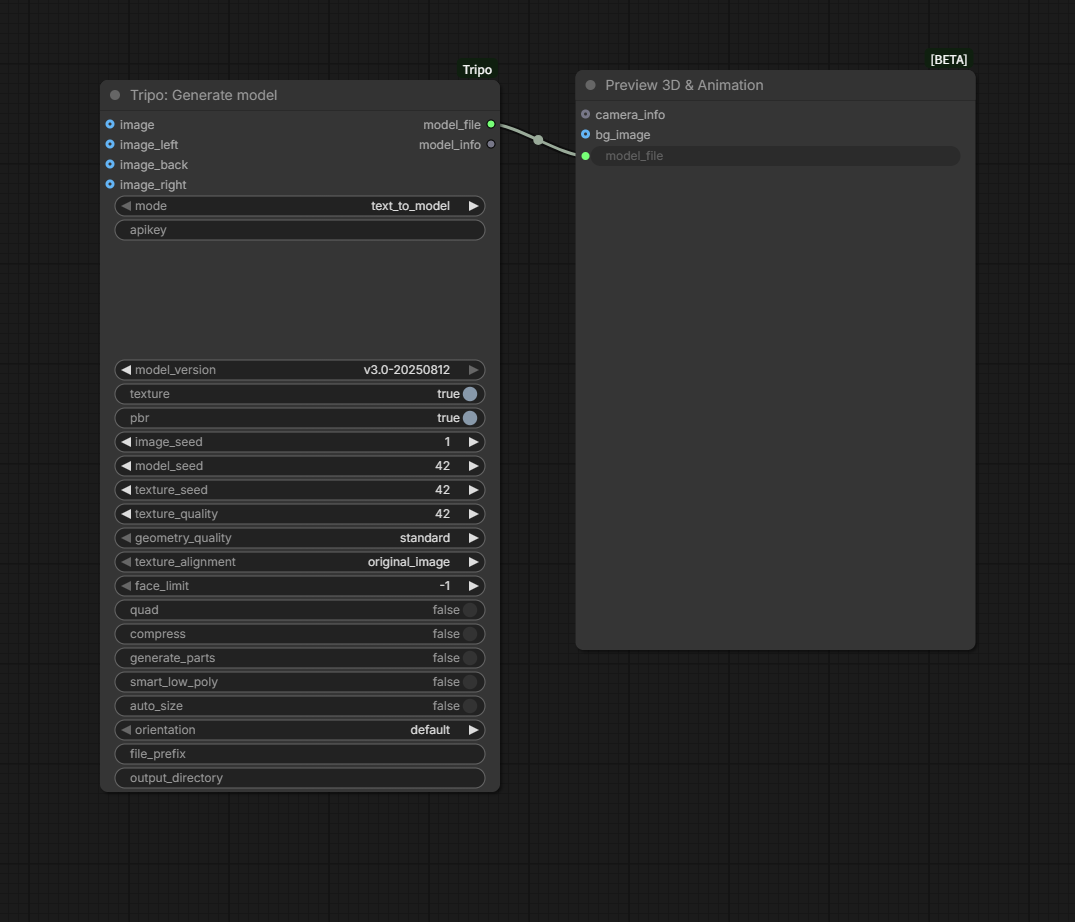
Generate a model from a text prompt and send model_file to Preview 3D.
Download the original workflow PNG
Image to Mesh
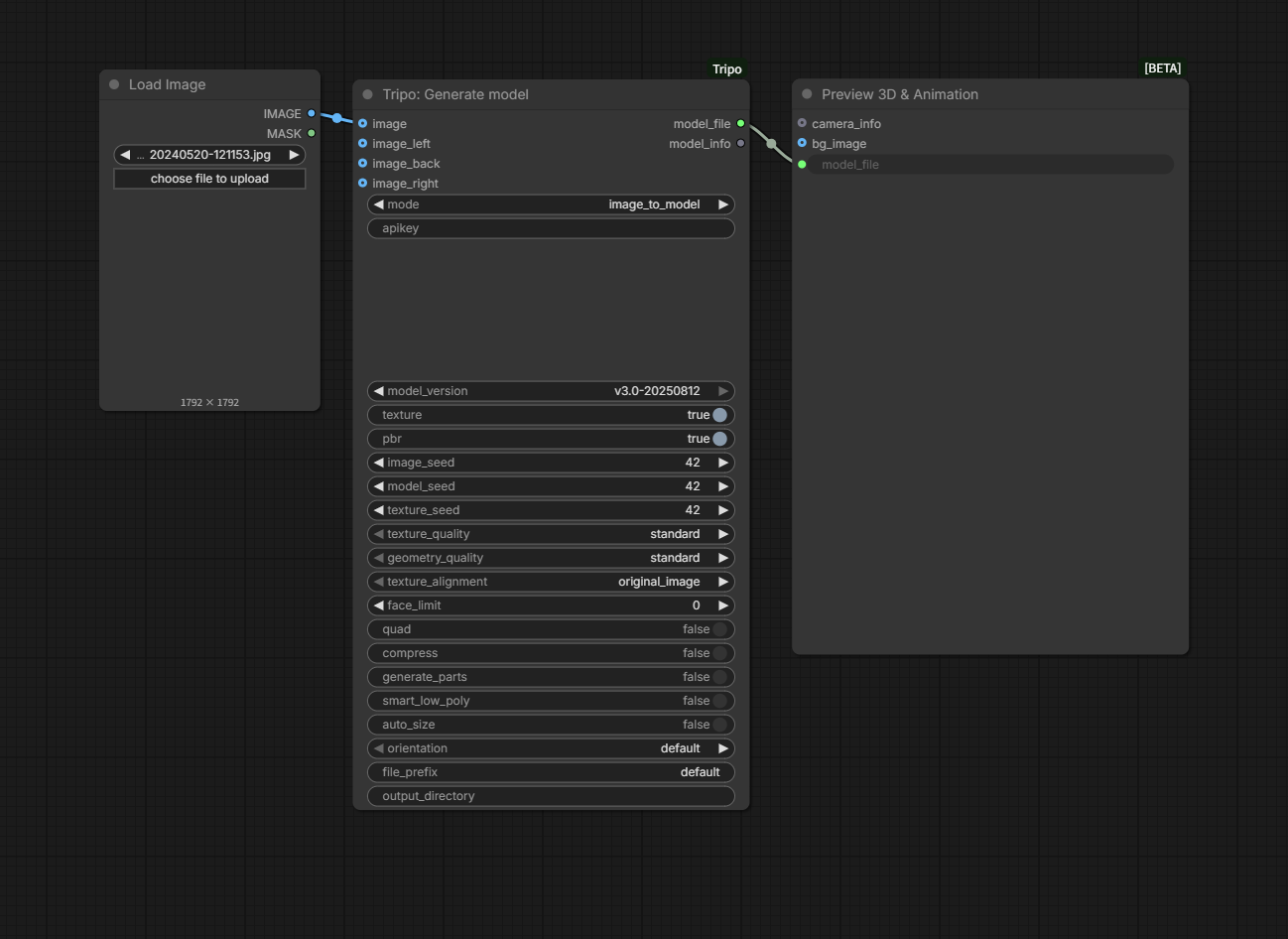
Load an image, connect it to Generate model in image_to_model mode, and preview the result.
Download the original workflow PNG
Multiview Images to Mesh
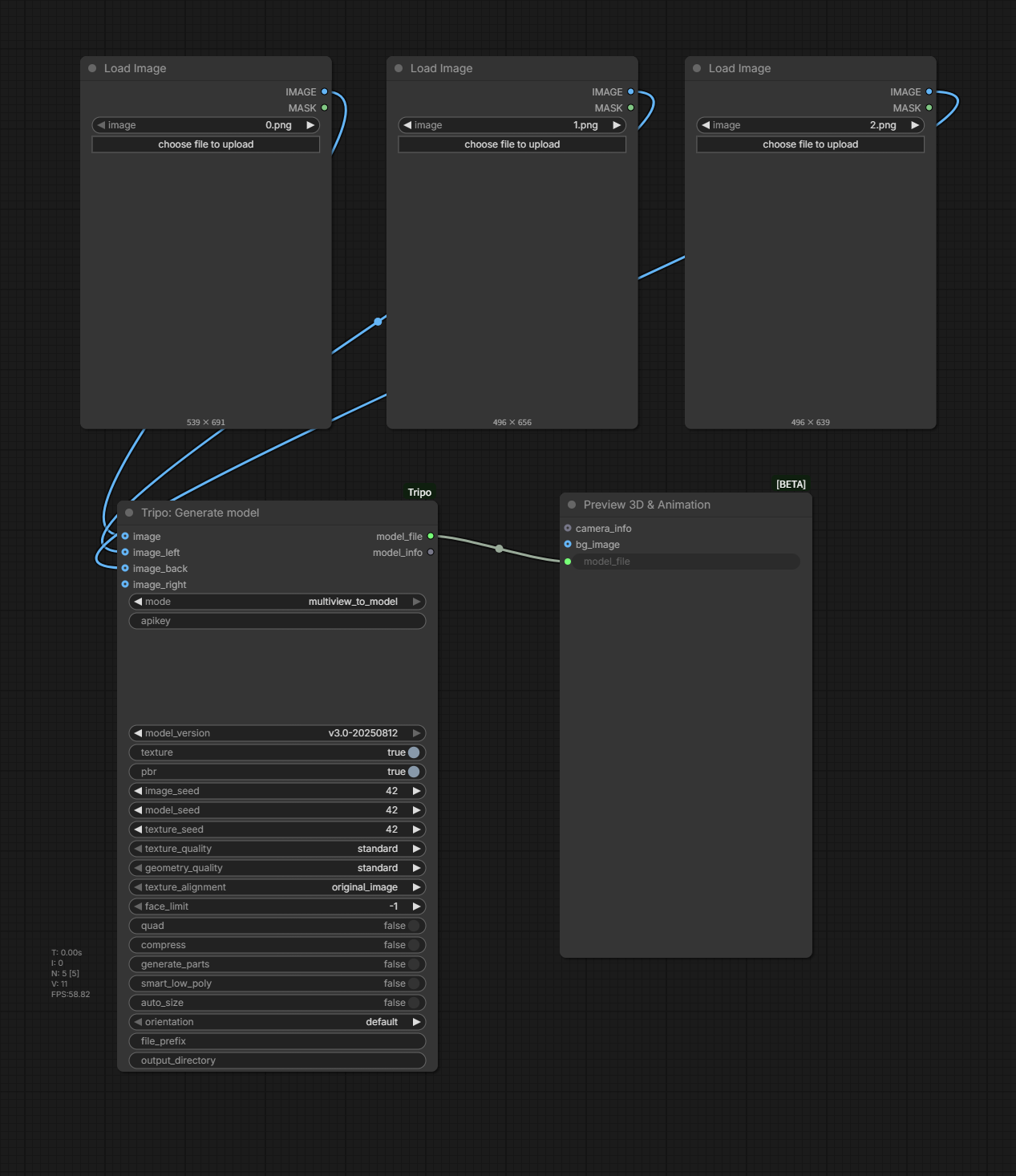
Connect the front and optional side views to Generate model in multiview_to_model mode.
Download the original workflow PNG
Texture a generated model
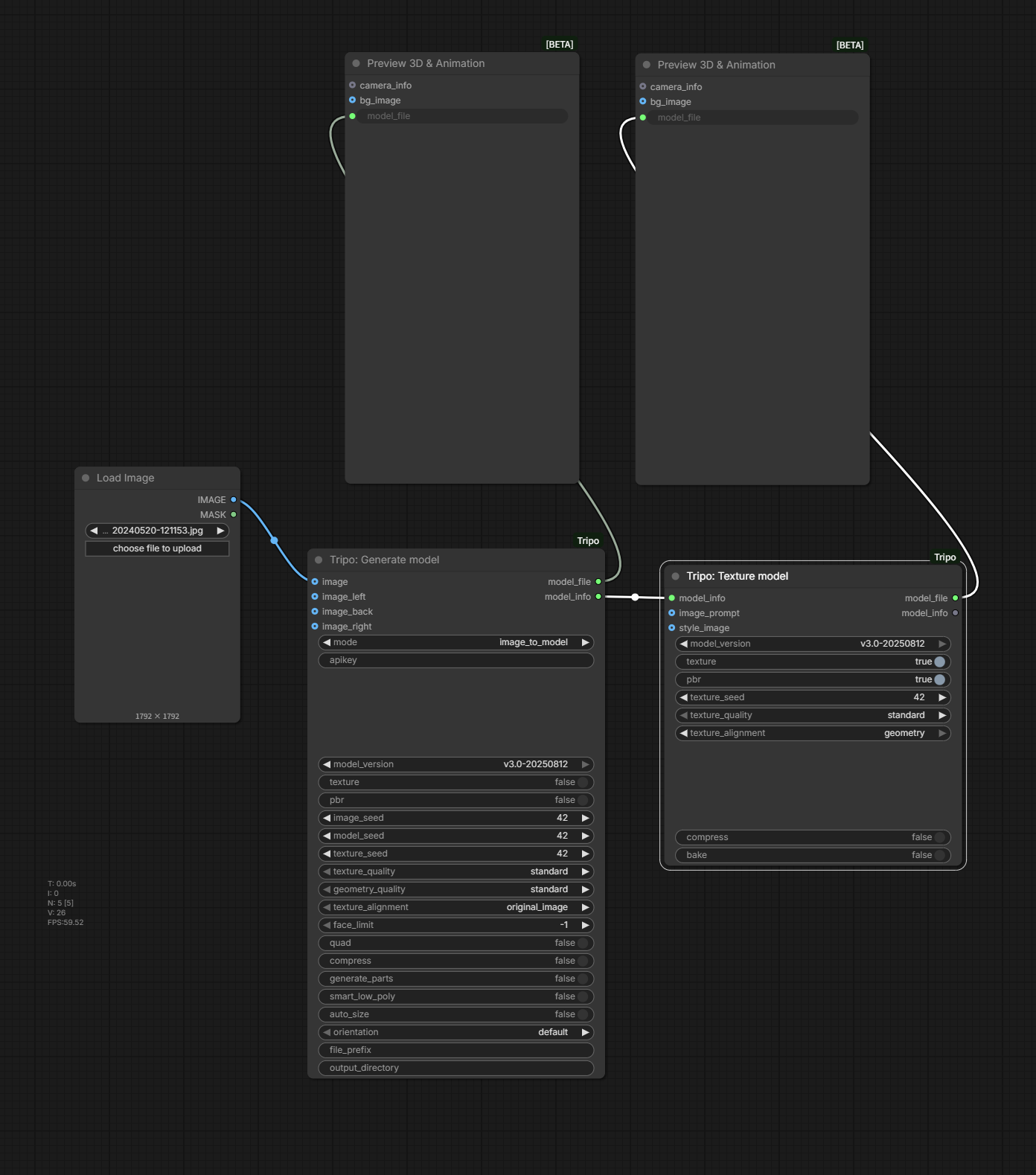
Pass MODEL_INFO from Generate model to Texture model and preview both outputs.
Download the original workflow PNG
Animation / Rig and export
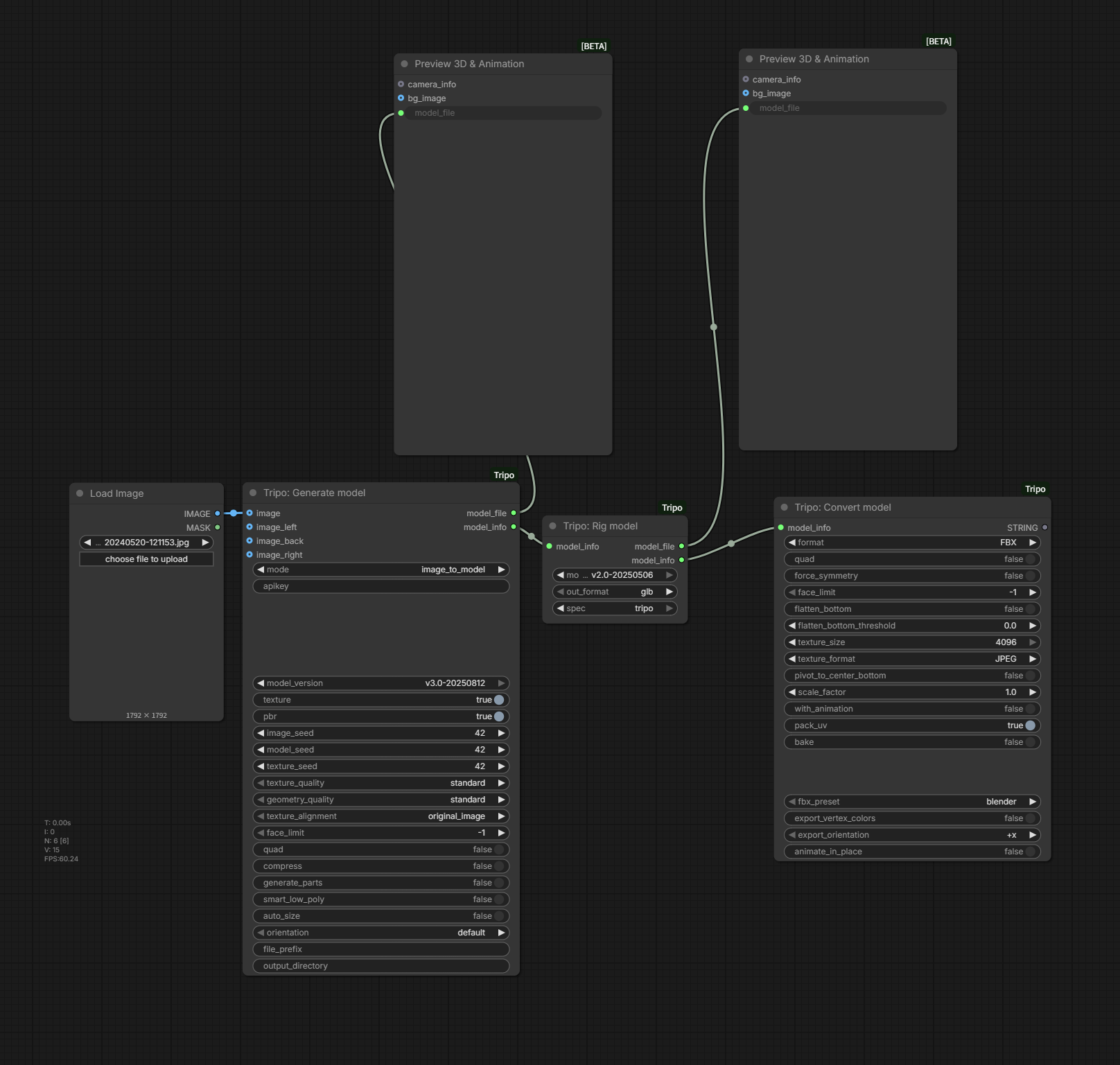
Download the original workflow PNG
Output and troubleshooting
By default, downloaded models are written to ComfyUI/output. Generate and Import establish file_prefix and output_directory; that metadata is propagated through downstream MODEL_INFO. A non-empty prefix is prepended to the downloaded filename. A non-empty directory moves the downloaded file to that directory and creates it when needed.
| Symptom | Check |
|---|---|
TRIPO API key is required |
Set a non-empty node key, TRIPO_API_KEY, or the field in config.json. |
ComfyUI-Tripo needs tripo3d>=1.0.0,<2.0.0 or tripo3d is not installed |
Install tripo3d 1.x as described in “Dependency version” above, then restart ComfyUI. Until the right version is installed, every Tripo node reports this message. |
Failed to get Tripo API balance |
The balance query failed in both regions: check that the key is complete and valid and that the network can reach the Tripo API. A single line ending in trying again with global=True followed by the balance is normal region detection. |
| Prompt/front image is required | Match mode with its conditionally required input. |
| Import does not start | Provide a model_url the Tripo server can reach or an existing model_file; URL has priority. |
| Model cannot be rigged | Try a suitable character model or set rig_type explicitly; with rig_type set to auto, Rig stops when the riggable check fails or returns no rig type. |
Rig or Retarget fails with No request was sent / No rig task was sent |
The rig version does not match the spec, skeleton type, or preset. Change the version, spec, or preset as the message suggests; the check runs before the task is submitted, so no credits are used. |
Refine or Stylize node reports no longer supported |
These capabilities are no longer supported as of 2.0.0. Remove the node from the workflow. |
Smart UV fails with Failed to unwrap UVs |
Make sure the input has at most 80,000 equivalent triangles; run a freshly generated model through Smart low poly first. |
| API task fails | Read the reported error_code and error_msg; also verify account access and balance. |
| Output cannot be moved | Check that output_directory is valid and writable and that the source file still exists. |
| Nodes do not appear | Restart ComfyUI, verify the repository directory, and install requirements.txt. |
| Import upload button fails | Verify the extension listed by the upload control and inspect the ComfyUI upload response. |